Comput. & Graphics Vol. 12, Nos. 3/4, pp. 591-594, 1988 0097-8493188 $3.00 + .00
Printed in Great Britain. © 1988 Pergamon Prom plc
Computer Graphics & Education
A SIMPLE ANIMATION PACKAGE
AHMET CO~;AR and BOLENT (~ZGOt~
Department of Computer Engineering and Information Sciences, Biikent University, Ankara, Turkey 1. INTRODUCTION
This paper discusses a simple animation package that animates sketches drawn by the user through a simple set of operations. The purpose of the animation pack- age is to demonstrate various computer graphics prin- ciples to those who are not experienced in the subject. Furthermore, it is an education tool for both art and undergraduate students. An expanded set of utilities allows for journaling for playback as well as a single level undo. This provides for an easy modification or correction of the errors that can be made during any session.
The system is written in C language on a Unix workstation environment. User input is handled through a menu driven system and the benefits of an event driven window environment are fully made use of [6]. This obviously simplifies the usage of the package by the merits of such an environment.
2. DATA REPRESENTATION AND GRAPHICAL PRIMITIVES
The basic representation type for the figures to be animated is the standard two-dimensional polygon. The system recognises certain standard shapes such as rectangles and circles, or the user can generate any closed or open polygon with the help of a mouse. An- other utility is a special purpose lettering system that generates vector drawn letters that can be used exactly like any other polygon. There are two important fea- tures of the system that are considerably effective in generating animation that looks very sophisticated yet is rather simple and fast in actual processing.
The first of these features is the ability to integrate images to the scenes. When a polygon is drawn, certain regions of it could be associated with images that are already digitized by external means. These images then are treated as an integral part of the figure and when the figure moves around the screen, the images follow. The handicap of the images, however, is in transfor- mations such as rotation and scaling where the original image can be destroyed through a costly, time-con- suming procedure. As long as the transformation is a motion, however, no such problem occurs. A future expansion with some image processing functions as described in Dawson[ 1 ] are being prepared. Images are not discussed in this paper.
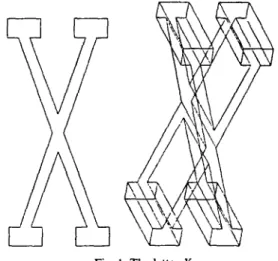
The second feature of the system is a pseudo-three- dimensional graphics. The user is not capable of de- scribing three-dimensional objects (unless he or she wishes to provide a file containing the data); further- more, the system does not recognise three-dimensional primitives. However, once a two-dimensional polygon
is drawn, it could be used as the base of a three-di- mensional prism. This is especially useful in making lettering with a thickness for the animation of letters, a very often used technique in animation. Figure 1 demonstrates a letter in two dimensions and a prism is constructed out of it.
3.
SOFTWARE COMPONENISThe package contains various utilities that are cate- gorised under the headings of graphical libraries, ani- mation libraries, and data base libraries. These are to be discussed in detail next.
3.1. Graphical utilities and the graphics library The graphical library is basically an interface be- tween the system and the user. In order for the package to be transportable, a set of basic graphical functions are provided that are referenced internally by the rest of the software. For the transport of the package to another system, the modification of these functions suffice. These functions basically perform the task of drawing a line, drawing a polygon, drawing a regular polygon such as a square, filling a closed polygon, and perform single pixel operations. Similar functions are provided for the images as well that insert images into the structures for polygons, display images, copy images back and forth from the memory to the screen, move images, destroy images, and set up operation codes for the display of images such as negating the image. Other than the basic graphical and image utilities, a set of functions are provided for the transformation of the polygons either incrementally for animation or on a one-time basis during the sketching (data preparation)
Fig. 1. The letter X. 591