YAŞAR UNIVERSITY
GRADUATE SCHOOL OF NATURAL AND APPLIED SCIENCES (MASTER THESIS)
VISUALIZATION OF GML DATA WITH XSLT FOR
WEB BASED GIS
Buket AKILLI
Thesis Advisor: Assoc. Prof. Dr. Murat KOMESLİ
Department of Computer Engineering
Presentation Date: 01.09.2014
Bornova-İZMİR 2014
iii
I certify that I have read this thesis and that in my opinion it is fully adequate, in scope and in quality, as a dissertation for the degree of master of science.
Assoc. Prof. Dr. Murat KOMESLİ (Supervisor)
I certify that I have read this thesis and that in my opinion it is fully adequate, in scope and in quality, as a dissertation for the degree of master of science.
Prof. Dr. Mehmet Cudi Okur
I certify that I have read this thesis and that in my opinion it is fully adequate, in scope and in quality, as a dissertation for the degree of master of science.
Prof. Dr. Vahap TECİM
--- Prof. Dr. Behzat GÜRKAN Director of the Graduate School
iv ABSTRACT
VISUALIZATION OF GML DATA WITH XSLT FOR WEB BASED GIS
AKILLI, Buket
MSc in Computer Engineering
Supervisor: Assoc. Prof. Dr. Murat KOMESLİ September 2014, 94 pages
In the GIS Industry, Development of Web-based Geographic Information Systems (GIS) is performed by popularity of Internet and Web Technologies. The internet has many advantages like working directly on the browser, platform independence and being freely available. There are a number of web-based GIS systems in existence. Each of these systems is developed by using various programming techniques, software and web technologies. So, there are various kinds of visualization results like static images or dynamic complex images with GIS functionality. Users easily obtain maps with using web-based Geographic Information Systems (GIS). On the contrary, the common method of GIS lacks interoperability and efficiency. To overcome these issues, we can apply the most common geographical data format known as Geographic markup language (GML). Geo data can be structured and visualized with this geographical data format. Because of the fact that the abovementioned GML format is a web-based technology, visualization has been made by a specific web-based graphical visualization technique, Scalable Vector Graphics (SVG). Due to the fact that there are more common properties between the two technologies, GML and SVG like being Extensible Markup Language (XML) based and other many features are described in the paper, GML documents have been indispensable appearing in SVG format. Web Feature Service (WFS) is a required technology to obtain a Geographic Markup Language (GML) data for advanced Web-based Geographic Information Systems (GIS). Besides these technologies, Extensible Style Sheet Transformation Language (XSLT) transformation specification also has an important role in the development of efficient web-based Geographic Information Systems. To accomplish the transformation of GML data into Scalable Vector Graphics (SVG), XSLT works together with an XSLT processor. Geo Data can be visualized differently by using different XSLT style sheets. Geo data in the form of GML is first obtained from
v
available WFS in real time and is then transformed into SVG by XSLT. At this point, it has been realised that Geographical data is needed to style effectively with Cascading Style Sheet (CSS) for supporting layer’s visualization rules. As a result of this necessity, the importance of styling with CSS has been understood. In this way, geo data will be visualized as high quality vector maps in browser software and we achieve data interoperability and efficient dissemination of maps. The software built on MapXtreme development kit using the C# programming language in the .Net environment with interactive user interface. The aim of this thesis is to provide an overview of the visualization of Geographic Markup Language (GML) markup data format which is obtained from Web Feature Service (WFS). Construction of a WFS server and client together in the unique web project will also be presented to aid in the presentation of this paper.
vi ÖZET
WEB TABANLI CBS İÇİN XSLT YARDIMIYLA GML VERİLERİN GÖRÜNTÜLENMESİ
AKILLI, Buket
Yüksek Lisans Tezi, Bilgisayar Mühendisliği Bölümü Tez Danışmanı: Doç. Dr. Murat KOMESLİ
Eylül 2014, 94 sayfa
İnternet ve web teknolojilerinin gelişmesi ile birlikte, Coğrafi Bilgi Sistemleri(CBS) endüstrisinde web tabanlı Coğrafi Bilgi Sistemleri (web CBS) uygulamaları ön plana çıkmıştır. İnternet’in doğrudan web tarayıcı üzerinden çalışmak, platform bağımsız olmak, ucuz olarak elde edilebilmek gibi avantajları bulunmaktadır. Günümüzde birçok web tabanlı olarak çalışan Coğrafi Bilgi Sistemi(CBS) uygulamaları bulunmaktadır. Bütün bu sistemler, çeşitli programlama teknikleri, yazılımlar ve web teknolojileri kullanılarak geliştirilmişlerdir. Bu çeşitliliğin sonucu olarak görüntülenen sonuç haritalar da statik özelliklere sahip veya CBS fonksiyonlarına sahip dinamik özellikteki haritalar olabilmektedir. Kullanıcılar, web CBS kullanarak haritalara web üzerinden kolayca ulaşabilmektedirler. Buna karşın Coğrafi Bilgi sistemlerinde yaygın olarak kullanılan metot olan masaüstü CBS uygulamalarında, uygulamaların birlikte çalışabilmek ve efektif olmaktan yoksun olmak gibi problemleri mevcuttur. Bu gibi problemlerin üstesinden gelmek için Coğrafi Bilgi Sistemleri endüstrisinde en çok tercih edilen veri formatı olan Coğrafi İşaretleme Dili (Geographic Markup Language-GML) formatı çözüm olarak tercih edilmektedir. GML coğrafi veri formatı ile birlikte coğrafi verilere bir yapı kazandırılabilmekte ve görüntüleme işlemi sağlanabilmektedir. GML, web tabanlı bir teknoloji olduğundan görüntüleme işlemi özel web tabanlı grafik görüntüleme teknolojilerinden Scalable Vector Graphics (SVG) teknolojisi ile sağlanabilmektedir. Bu iki teknoloji arasında bulunan yapısal benzerliklerden başta iki teknolojinin de Extensible Markup Language (XML) tabanlı olması olmak üzere, diğer birçok benzer özelliklerden dolayı GML dokümanları, SVG grafik formatı olarak görüntülenebilmektedir. Gelişmiş bir web CBS’de Web Feature Service (WFS) olarak adlandırılan Web özellik servisleri, GML veri formatının elde edilmesi için gerekli olan bir teknolojidir. Bu teknolojilerin yanında, Genişletilebilir Stil Dönüştürme Dili (Extensible Stylesheet Language Transformation-XSLT) kullanılarak web tabanlı bir
vii
coğrafi bilgi sistemi serbest olarak geliştirilebilir. GML verilerinin görüntülenmesi için Ölçeklenebilir Vektor Grafik biçemine (Scalable Vector Graphics-SVG) formatına dönüştürülmesini sağlamak amacıyla XSLT kodu geliştirilmiştir. Coğrafi veriler farklı XSLT stil dosyalarına göre farklı görünümlere sahip olabilmektedirler. Çalışma mekanizması olarak öncelikle GML ile hazırlanmış olan coğrafi veri dosyası, WFS yardımıyla gerçek zamanlı olarak elde edilir. Daha sonra, XSLT dönüştürme teknolojisi ile SVG formatına dönüştürme sağlanır. Bu noktada CSS stil kazandırma teknolojisinden de yararlanılarak katmanlara görüntüleme özellikleri kazandırılabilir. Bu şekilde, bir GML veri dosyası, tarayıcı yazılımı üzerinde yüksek kaliteli bir sayısal harita olarak görüntülenmektedir. Bu tez kapsamında, .Net platformu üzerinde, C# programlama dili ile ve MapXtreme geliştirme aracı kullanılarak interaktif bir kullanıcı arayüzü ile hizmet veren bir web-CBS geliştirilmiştir.
viii
ACKNOWLEDGEMENTS
This study titled “Visualization GML Data with XSLT for Web Based GIS” and presented as Master’s Thesis by Yaşar University Graduate School of Natural and Applied Science Department of Computer Engineering. I would like to special thank to my supervisor Assoc. Prof. Dr. Murat KOMESLİ for his support, advising and help on my thesis. He has guided me with suggestions and opinions, making necessary data easier to obtain and for supporting me with valuable contributions during my thesis study.
I would also like to especially thank the Yaşar University Rectory and the Information Technologies Department for techical support and for their help and support in my study.
I would also like to thank, the İzmir Büyükşehir Belediyesi (Izmir City Council) for its help with my thesis study.
In addition, many thanks to my deceased father, my mother and my family for encouraging me to manage this study during my thesis. Without their support this study could not have been realized.
Buket AKILLI İzmir, 2014
ix
TEXT OF OATH
I declare and honestly confirm that my study, titled “Visualization GML Data with XSLT for Web Based GIS” and presented as a Master’s Thesis, has been written without applying to any assistance inconsistent with scientific ethics and traditions, that all sources from which I have benefited are listed in the bibliography, and that I have benefited from these sources by means of making references.
…/…/ 2014
Buket AKILLI
x TABLE OF CONTENTS Page ABSTRACT iv ÖZET vi ACKNOWLEDGEMENTS viii TEXT OF OATH ix TABLE OF CONTENTS x
INDEX OF FIGURES xiii
INDEX OF TABLES xvi
INDEX OF SYMBOLS AND ABBREVIATIONS xvii
1 INTRODUCTION 1
1.1 Subject of the Thesis 1
1.2 Problem Definition 4
1.3 Aim of the Thesis 5
2 Geographical Information Systems (GIS) 6
3 Extensible Markup Language (XML) 11
3.1 XML Namespaces 15
xi
4 Geography Markup Language (GML) 20
4.1 GML Schemas 28
5 Extensible Styleseet Language For Transformation (XSLT) 31
5.1 XSL-FO XSL Formating Objects 38
6 Scalable Vector Graphics (SVG) 40
6.1 Structure of SVG Vector Graphics 41
6.2 GML Documents to SVG Graphics 45
7 CSS Styling Language 47
7.1 Basic CSS Selectors 47
7.2 CSS Usage in SVG Files 49
7.3 CSS Properties 56
8 Client Side Scripting With Javascript and Ecmascript 58
9 Web Feature Services (WFS) 62
9.1 OGC Web Services 62
9.2 Web Map Services (WMS) 64
Web Map Services (WMS) Operations 64
9.2.1
9.3 Web Feature Services (WFS) 65
Web Feature Services (WFS) Operations 66
xii
10 MAPXTREME Development Toolkit 68
11 Configuration Settings 69
12 Related Works 73
13 Application 75
13.1 WFS Client 76
13.2 Mapinfo Tab Files Section 81
14 Conclusion 91
REFERENCES 92
xiii
INDEX OF FIGURES
Figure 2.1 Client in the Server-side operations 8
Figure 2.2 Three-tier architecture in GIS 9
Figure 3.1 XML Functionalty Error! Bookmark not defined.
Figure 3.2.1 Role of XML Schema in Systems Error! Bookmark not
defined.
Figure 4.1 Simple GML Geometry Elements 21
Figure 4.1.1 Geometry Elements of Point Error! Bookmark not defined. Figure 4.1.2 Geometry Elements of Polygon Error! Bookmark not defined. Figure5.1 North Arrow with SVG Format 36
Figure 5.1.1 XSLT Processor Functionalty Error! Bookmark not defined.8 Figure 5.1.2 Translating of GML to SVG 38
Figure 6.1.1.1 Circle Drawing with SVG 41
Figure 6.1.2.1Polyline Drawing with SVG 41
Figure 6.1.3.1Polygon Drawing with SVG 42
xiv
Figure 7.2.1. CSS Usage in SVG Files 50
Figure 9.1.1 The difference between a raster and vector map format 63
Figure 9.2.1.1 A jpeg formatted map 65
Figure 12.1 The Application Mainpage’s view 73
Figure 12.1.1 WFS Client Connection 74
Figure 12.1.2 Adding a New Connection 74
Figure 12.1.3 World Capitals 75
Figure 12.1.4 Oceans returned from WFS 76
Figure 12.1.5 Layer Show/hide Property 77
Figure 12.1.6 CSS Customization Tool 78
Figure 12.1.7 Customized Shape with the Tool 79
Figure 12.2.1Turkey Tab File Visualization 80
Figure 12.2.2 Selection of İZMİR on the Map 80
Figure 12.2.3 Turkey Map with Layers 81
Figure 12.2.4 Turkey Map without Layers 81
Figure 12.2.5 Labeling on the Map 82
Figure 12.2.6 Theme options 82
xv
Figure 12.2.8 Pie Theme related to Turkey 83
Figure 12.2.9 Bar Theme related to Turkey 83
Figure 12.2.10 Graduated Theme related to Turkey 84
Figure 12.2.11 Update Panel 84
Figure 12.2.12 GML File Load Panel 85
Figure 12.2.13 Blank Turkey GML visualization 85
Figure 12.2.14 Turkey Provinces Map 86
Figure 12.2.14 Turkey Provinces Map with Label 87
Figure 12.2.15 Provinces of Turkey 87
xvi
INDEX OF TABLES
Table 4. 1. SVG Correspondences of GML Geomety Elemenets 24
xvii
INDEX OF SYMBOLS AND ABBREVIATIONS
ASCII American Standard Code for Information Interchange
API Application Program Interface
CSS Cascading Style Sheet
CBS Coğrafi Bilgi Sistemleri
DTD Document Type Definition
DSSSL Document Style Semantics and Specication Language
GML Geographic Markup Language
GIS Geography Information System
HTML Hyper Text Markup Language
HTTP Hypertext Transfer Protocol
OGC Open Geospatial Consortium
RDF Resources Description Framework
SVG Scalable Vector Graphics
URL Uniform Resource Locator
WFS Web Feature Service
WMS Web Map Service
1
1 INTRODUCTION
1.1 Subject of the Thesis
Geographical Information Systems, abbreviated as GIS, have a variety of different definitions and interpretations according to variety of different disciplines. One of the definitions of Geographical Information Systems (GIS) among these definitions is “It is an information system that makes spatial-based information which is obtained with observations and non-spatial information, collecting, storing, presentations to the user as completeness”. The history of GIS originates in 1960. In those years GIS was used for special tasks for the military in the USA and Canada. But after 1980, it started to be used for commercial areas, becoming more widespread. Besides this, in recent years, the internet has become popular rapidly and as a result Web-based Geography information systems have also become developed for this popularity. Web-based Geography Information Systems are growing day by day. In Geography Information Systems any information which enables to give reference information to any location is named as Spatial Information. Spatial information is a kind of information which obtains data for users related with map structure. For the reason being that the web/internet is more popular, Information Systems become a concept which is used among various disciplines. It has started to handle using and administration of spatial information which is needed for various disciplines together with information systems. In this process, it is known that 80% of information is based on location information. For the reason of importance of the spatial information, it becomes more important to represent world surface the most near to real. In addition, it is needed to standardize geographical information which is used in applications. These advances have started to be assimilated by corporations and have contributed to the establishment of interoperability. Web-based Geographical Information Systems have started to become important areas of projects which are performed by software development corporations. The internet is preferred for the reason of ease of the presentation of the Geographical Information Systems and usage of this kind of information. In addition, thanks to the internet, it is not an easy development of open source coded projects.
Data Source of a Geographical Information Systems can be handled as “category criteria” which is used in the GIS industry. It can be shown that Geographic Markup Language (GML) is a source type for these types of applications. For this
2
reason, GML source data type is the type of data of this piece of research. With the second version of the GML geography markup language, a foundation was layed for the spatial-locational internet on 20 February 2001 by the Open Geographical Consortium (OGC) (Dempsey, 2001). The Open Geographical Consortium (OGC) was established in 1994. It is an industry community which works with ISO/TC 211.The aim of this community is to specify standards related to locational informations applicable (Aras and Yıldız, 2011). The Vision of the community is that it is provided to construct a platform, an application or a network which is of benefit for all users who need or use spatial and locational information (Aras and Yıldız, 2011). The mission of the community is that spatial/locational interface and coding technic standards is rendered to open situation for all users (Aras and Yıldız, 2011). GML markup language is Open Geography Information Standards community which is published from OGC (Open Geospatial Consortium) and one of the base components of national geography data infrastructure. Being the same as all the other ISO standards, translation of Geography Information Standard to national standards and distribution of these standards in Turkey is up to “Türk Standartları Enstitüsü” (TSE)(Wikipedia, 2010). GML is published by Open Geospatial Consortium (OGC)
and is based on XML Extensible Markup Language (XML). GML has been developed for interoperability problems for a long time now. Presently, the Geography Markup Language is used for obtaining transportability of spatial /locational information among platforms and storing this information. In GML (Geography Markup Language) documents, Geographical data is stored as isolated from presentation elements because of XML based technology. With these properties, it is possible to get a GML (Geography Markup Language) document’s different visualizations on web browsers. GML (Geography Markup Language) data file’s visualization technique is the same as XML (Extensible Markup Language).
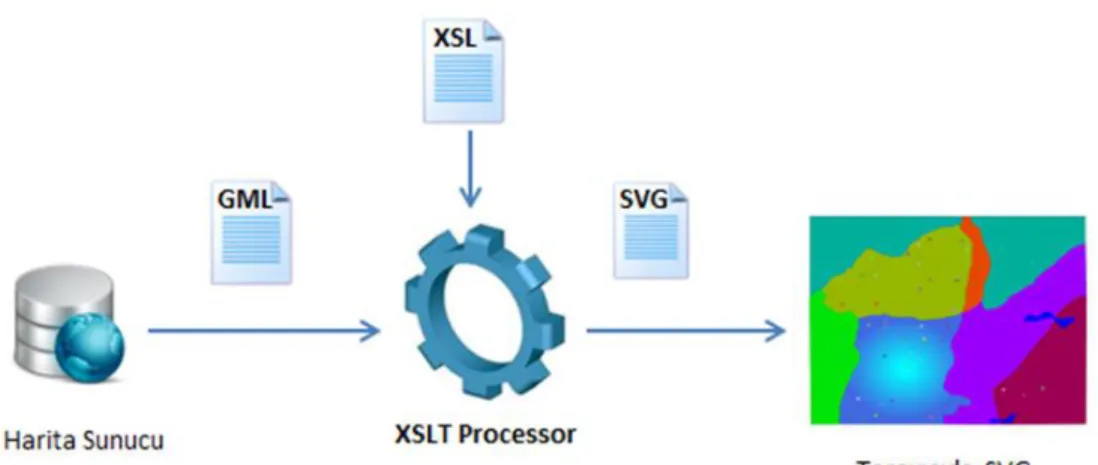
It is known that interpretation of the document which is prepared with XML (Extensible Markup Language) is made with XSLT (Extensible StyleSheet Translation Technology) and visualization of this XML based document, XML document, is made with SVG (Scalable Vector Graphics) on the web browser. GML data is visualized in SVG to provide high-performance and is possible with the XSLT translating mechanism. (Keeneth S.Herdy and others, 2008) At the same time, produced SVG documents are styled with CSS. Interactivity properties are made with JavaScript and EcmaScript scripting languages.
3
Graphical representation is necessary for visualization of any location. The most preferable method/technology for visualization of XML based data is SVG (Scalable Vector Graphics) technology. This technology produces scalable graphical vectors. SVG (Scalable Vector Graphics) technology is used for lack of producing this type of visualization in HTML. XML technology works with embeded HTML tags mechanism which is located in HTML technology for web browsers. SVG (Scalable Vector Graphics) technology is a technology which constructs dynamic graphics. It manages to visualize spatial/geographical objects the most effectively. It is possible for these mentioned web technologies to be implemented for web-based systems. SVG vector graphics is the most preferable technology for the following reasons. The first reason is that it is necessary for possible minimum bandwidth size. Another reason is the fast downloading to other web technologies. These reasons make SVG the most preferable. GML (Geography Markup Language) and SVG (Scalable Vector Graphics) have the same structure and format. For this reason it is possible to get SVG vector graphics from GML data (Geography Markup Language) with XSLT (Extensible StyleSheet Translation Technology) transformation files. It is possible when XSLT transformation files are applied to one more type of GML files. Then, XSLT becomes an automation for this visualization of GML files.
CSS Commands can be included externally which is defined in XSLT (Extensible Stylesheet Translation Technology) translation file by defining in an external CSS file. It should be noted make that internally defined CSS Commands are more prior than externally defined CSS commands. In externally defined CSS commands, there are some properties like that it splits style files from style elements. Thus, it can be possible for externally defined CSS commands that it is valid for all GML (Geography Markup Language) files. In addition it is possible visualize the same GML file with different stylesheet files. With SVG vector graphics, which are obtained from XSLT translation files, it is possible to apply various platforms like a web page or an XML file.
There are 10 sections in the scope of this thesis. The first sections, “Geography Information Systems (GIS)” and “Web based Geographical Information Systems” are handled as a topic. In section two, “XML Extensible Markup Language” is mentioned. In section three, the “Geography Markup Language (GML)” is dealt with. Section four, covers the “XSLT (Extensible Markup Language) Translation Technology”. In section five, “SVG (Scalable Vector Graphics)” is described. In
4
section six, “Styling with CSS (Cascading Style Sheet)” is explained and then some information about the topic is given. In section seven, a scripting language, JavaScript, is explained. In Section eight, “WFS Services” for obtaining GML file from various servers is covered. In section nine, “MapXtreme Development Kit” it is mentioned and explained. In section ten, configuration settings are mentioned as a topic. In section eleven, application is introduced. In section twelve, the advantages of these technologies used is discussed.
1.2
Problem DefinitionThe starting point of the thesis is Visualizing the most preferred geographic data format document, GML, at Geography Information Systems (GIS) on the web platform. In addition, it is needed to pass in front of the commercial software which is in front of the obstacle for visualizing spatial information. At the same time, it is purposed to overcome of the interoperability problem with using GML spatial data files including web technologies. Geography Markup Language (GML) which provides the standardization of the system data files are not a presentation document in other words, it is not a structure via the web browser, users can view. For this reason, this GML file is necessary to translate automatically to presentation file with the help of a technology for visualization. This comprises one of the sections of the problem.
Individual addressing of the geometry of the elements and topologies which are located in GML documents for this automatic translation. Besides this, it is intended to access smart vector format maps which is high-resolution, scalable with SVG (Scalable Vector Graphics) web technology, in order to improve the quality of the produced maps. Another section of the problem is that, the mentioned GML files sizes are very large. The problem is that the performance which is necessary for interpretation on the web browser. The main problem in this thesis is confirming what prevents some of the disadvantages of the internet. Thus, together with the thesis, it will have a “Web Map Service” which performs freely representations of maps that are located on the user's own computer or connected to a preferred service provider.
Nowadays, Web services (WS) is a technology that has active application areas according industrial and technology. It has shown the same trend in demand in the GIS industry. As a result, it is becoming possible to access the maps with WFS (Web
5
Feature Service) and WMS (Web Map Service) services. The scope of this thesis is that the preferred WFS services which can cover GML (Geography Markup Language) data presentation from web services.
.
1.3 Aim of the Thesis
The aim of this thesis is to determine the strategy for visualizing GML geographical data standard which is one of the common development areas in and academic and industrial areas and is a standard of Geographical Information Systems (GIS) on the web browser with web technologies and standards.
In the realization of this study, it was deduced with the examination of the web technologies that can be made compatible with each other and problems are analyzed in traditional models and Web services are can be reviewed and applications were made for each of the inspected web technologies in practice and then it was overcame determination of the technical implementation strategy by combining all distributed technologies.
6
2 Geographical Information Systems (GIS)
Geographical Information Systems (GIS) are an information system that obtains storage, manipulating, visualizing, querying, analyzing of geographical information and other in information related with geographical information. Geographical Information Systems (GIS) are interdisciplinary systems consisting of a merger of the two disciplines which are Geography and Information Systems. Geographical Information Systems (GIS) are special systems that bring together the power of a relational data base for use and the Visual interface of maps. The relationship between spatial/geographic information and other information related with geographic information which belongs to any location on earth can easily be incorporated with the help of this system. In the early days of the Geographic Information Systems (GIS), there was a computer and the data sets located on the same computer. In a globalized world, this situation will be a problem for enterprises. On the other hand, the biggest obstacle in front of the Geographic Information Systems was the capability of a system to interact problem and interoperability. In the 1990’s, There had been significant impacts on the geographic information systems for the rapid spread of the internet. These are “Data Access”, “Data Transmission”, “Accessing Geographic information systems (GIS) analysis functions “. The benefit of the Geographic Information Systems (GIS) regarding accessing the analysis functions is that the user can access and process the remote computer with just using internet a browser only. Theinternet was first introduced in 1969 for protecting the information related with military in a time of war. Since 1983, the internet has started to be used as a TCP/IP supported link. For this reason, the internet has become an appropriate platform for sharing geographical information with represented facilities. Information is obtained from data in Geographical Information Systems. An information system resumes thanks to data which constitutes the information. In Geography Information Systems (GIS), the data gathering phase is the most time consuming and requires the maximum cost phase. Because of this, Geography Information System (GIS) workers adopt an approach that obtaining the data obtained from other sources before, instead of obtaining the data from scratch and converting your own GIS format for lessening costs. At this point, displaying in web browsers to convert GML formatted data to display format serves to “data conversion and visualizing” which is the most important part of the Geographic Information Systems (GIS).
7
More effective Geographic Information System applications have been developed by utilizing Web technologies, but there is no Geographic Information System application which serves more than one platform, the discipline and the user. This situation has forced developers to revise the adopted GIS system approaches and to create a new State-of-the-art integrated system. Web based Geographical Information Systems have been developed under of this scope and use of web technologies. These web technologies are GML (Geographic Markup Language), XSLT (Extensible Style sheet Language Transformation) transformation language, SVG (Scalable Vector Graphics) vector graphic language and WFS (Web Feature Services) services. To understand a web-based Geographical Information System (GIS) working mechanism, it is necessary to know the principles at work.
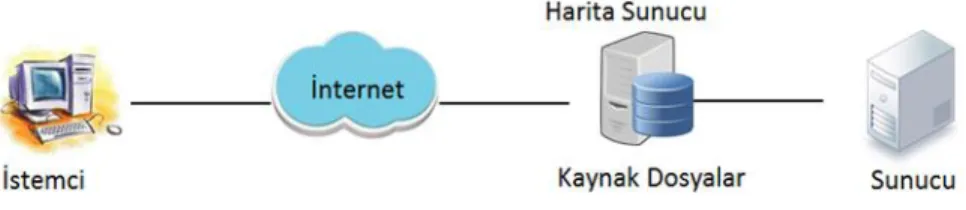
In the architecture of the client and server, the client and server connect by using the HTTP protocol on the intranet or internet in TCP/IP (Transmission Control Protocol/ Internet Protocol) based networks. (Aydınoğlu A.Ç., 2003). With the help of a web browser, a command is sent to the server by the client on CBS. (Aydınoğlu A.Ç., 2003). The answer which is produced by the client in the server-side operations result is sent back through the URL (Uniform Resource Locator) addressing. (Aydınoğlu A.Ç., 2003). In Figure 2.1 this scenario is described.
Figure 2.1Client in the Server-side operations
Software functions which are used in the Geographic information systems like “Accessing spatial data and analysis functions”, ”geographical analysis”, “viewing analysis results” operations are located both traditional Geography Information Systems and web-based Geography Information Systems. There are a number of properties related with web based Geography Information Systems.
Because of web based geographical information systems being structured as client/server architecture, when analyzing, operations are distributed between the
8
server and the client. Firstly, the client requests the data and analysis function from the server. And then the server sends the request to the client. Web-based Geographical Information System (web GIS) are distributed and dynamic systems. Because of this, all data and applications are located on the server and the client only makes of using the system.
In classic models of web-based geographic information systems, there are two components. These components are client and server. But for three-tier web-based GIS systems, there are three components. These are client, GIS (Geographical Information System) web server and server. This thesis also adopts the three-tier architecture. In Figure 2.2 this scenario is described.
Figure 2.2Three-tier architecture in GIS.
There are differences between web based geography information systems and standard GIS systems. These are storage and processing of the information and user interface. There are a lot of advantages of web-based geographical information systems to other standard geographical information systems. These advantages are explained below;
-Ease of Access: Users can reach easily the system just using the internet from anywhere in the world via a Web browser with no restriction and without the need for any other 3rd party software. This feature led to elimination of the discrepancy between data.
-Ease of Use: Users who do not have knowledge about this system can easily use the system.
9
-Standard Interface: All of the users can easily access a single standard system interface because of depending on a single service provider.
-Dynamic Maps: Works with dynamic maps which query, analyze and communicate the databases with the introduction of the internet.
-Storage Costs: Thanks to the internet, the user doesn’t need store the maps to work on. They can access the system through the internet when they want.
-Economic and fast Maintenance: Because users access information from only one source when have any problems or when updating service, provider (server) operations are arranged only with one service provider and then the service to the users is provided simultaneously. In other words, update, maintenance and repair operations are made separately for each user.
Here it can be seen that Geographical Information systems (GIS) have an important role for using geographical information. On the other hand, the internet is important for sharing this information which is used from the GIS system. In web-based Geographical Information systems users can easily reach maps which they want over the internet. At the same time, users can save these maps to their own computers. Thus, they can have the opportunity to work on them. When developed, a web system which works on the internet has a lot of components which determine the type and character of the system. These are the methodologies which are dependent on the users’ requests, software architectures, the technologies and methods to be used. The characteristic features of the data for determining which technologies will be used for the web based geographical information systems’ applications which are to be developed are taken as the benchmark. It is possible to come across 3 different strategies. These are “Server-Side”strategy, ”Client-Side” strategy, “Hybrid” strategy. In “Server Side” strategies, the client sends the request to the server and the map is sent back to the client as a response after processing the request on the server side. In “Client Side” strategies, evaluating the request sent by the client is made on the client’s computer. In “Hybrid” strategy, the relationship between them will continue after send the request to the server.
Besides these, the mentioned advantages of web-based geographic information systems, data retention and backup operations are issues that should be considered. Due to the large size data, additional backup areas are needed. It is also important that
10
sharing of collected information, besides that of data collection during GIS (Geography Information System) development. There are some problems during transfer of backed up geographical information to the web browser for visualization. These problems are insufficient bandwidth and downtime issues. These problems are the difficulties of working with large scale data.
11 3 Extensible Markup Language (XML)
Because communication has become an indispensable part of our lives, a common language which is available to all of the people is needed. For this reason, a common language was sought. English, which is the most commonly used in the world of technology and the internet has become the common language in the greater world. Based on the same sample, XML (Extensible Markup Language) technology is a language which is the most appropriate standard language for communicating between the different systems (an incompatible) in the Information Technology World. The purpose of naming as Extensible is that it is a structure which defines analyses and reshaping the data as a technology as a result it is a technology which is prevents shortcomings of HTML. Today, XML technology which is software and hardware-independent markup language is used as a packing service while transferring data between applications and platforms. In addition it works on the tasks that running in the applications background. In Geographical Information Technologies, XML is most important technology for querying processing. It is known that XML transferring occurs during the client/server relationship among all GIS systems. As can be seen below, in Figure 3.1, there is a showcase of this processing.
Figure 3.1 XML Functionalty
XML (Extensible Markup Language) is a data format which is published freely from W3C consortium. W3C consortium is a community that publishes all web standards. XML (Extensible Markup Language) technology is derived from GML (Standard Generalized Markup Language) technology. XML which is very flexible structure is a markup language, in fact, has emerged for use in the field of Electronics. XML Extensible Markup Language has a wide range of areas. Now,
12
XML (Extensible Markup Language) is important for transportation of large scale data on the web platform. Today, XML is a format which is supported by many applications. The most important role of the XML technology is that it is a necessary technology for interoperability problem. So much so that, once it is created, an XML (Extensible Markup Language) file is a source for more than one application. There is XML support for almost all programming languages. At the same time, all database systems support the XML technology. In XML technology, data is defined with metadata. Metadata is the definition of data, in other words, it is said that data definition about the data.
In Geography Information Systems (GIS), XML technology is important for querying processes. It is possible to work and access the web services with using XML technology. Geographical information which is written in XML markup language is send to outside world by using a stream.
The character of XML (Extensible Markup Language) is the same as HTML (Hyper Text Markup Language). Both of them are text-based languages. XML data format defines data as sequential alignment with one or more elements.
If we examine the structure of the XML, there are two components. First is the title which includes some of the required information for the parser and elements. The second component is that of XML schemas which validate XML documents and include a set of rules inside XML documents. XML schema’s previously used DTD (Document Type Definition). XML documents are located in web browser and embedded. In terms of the meaning of the XML technology, it can be expressed as encoded information in the text. Differences between GML and HTML are that it is not necessary previously defined labels and users do tag definitions in a manner appropriate to the rules. Due to these features, it can be said that XML markup language is highly flexible and extendible. In addition, XML is easy to understand because of ASCII (American Standard Code for Information) based by people and computers. (LIANG ZOU, 2004).
Because of text-based technology, XML can be combined with a wide range of data types which contain text. Because of this, it is possible to store easily in the same file geographical information and other non-geographic information which dependent
13
to geographic data. This situation is a technique that access geographical/spatial information.
There are two methods for XML (Extensible Markup Language) operation. First of these is DOM (Document Object Model) streaming model, second of these is SAX3 which is a basic API (Application Program Interface) for using XML (Extensible Markup Language).
XML (Extensible Markup Language) processors handle XML documents in the memory with taking as DOM (Document Object Model) tree. When it is considered a large XML documents, DOM is insufficient because it requires internal memory space and time. On the contrary, in the streaming model, the XML data document is displayed as a data stream. One of the great advantages of using the streaming model is that it requires more economic footprint in the memory. However, in the streaming model, unlike the DOM (Document Object Model), it is not possible that users’ querying operations are worked directly and random access to documents. Performance issues are important because the aforementioned is Geographical Information System (GIS) which uses geographical data.
Below there is an example which is a short road segment GML encoding that showcases a road segment and also showcases XML structure’s characteristic properties. Attention should be made here that the data is kept together and at the same time there is a hierarchical approach in the relationships to each other.
<?xml version="1.0" encoding="ISO-8859-1"?> <uka:Road fid ="highway30">
<uka:numLanes>5</uka:numLanes>
<uka:surfaceType>gravel</uka:surfaceType> <gml:centerLineOf>
<gml:LineString srsName = "epsg4361"> <gml:coordinates> …. </gml:coordinates> </gml:LineString>
</gml:centerLineOf> </uka:Road>
If we talk about XML's writing rules, there is an element of an XML document that is just a "root" element. Tag and attribute names are "case sensitive". Each opened tag has a closing tag. There is an important point is that there is no intersection in the same named tags. It should be written attributes with taken quotes
14
in XML documents. XML document which include all of these requirements named as “well formed” XML document.
There are various kinds of XML editors like notepad or other improved XML editors. These improved XML editors provides the convenience of preparation. Users define two different types for preparing XML documents. The first is that the user makes a definition of tag pairs which is including the opening and closing tags. Second is that user enters tags content. We can come across many different places with XML technology. Because, XML technology has extensive uses of area. For example, it is possible that XML technology consists with new programming languages thanks to its flexible and understandable structure and easy creation and processing and ease of wide area of usage of XML technologies. GML is also an example of these constructed languages. In this section, XML documents were analyzed rapidly and shortly, now, general structures of GML documents are handled.
In the scope of the thesis, there is a developed application. The application is based on .Net platform. It is known that .Net platform uses XML technology in widespread area and it presents rich features for make operations on the XML data. For example, there is an XML address file which holds web service name inside and previously entered on the user’s account. In this file, there are an URL path of WFS service and a name which is defined by user for this service. When it is wanted to add a new address information to this file, it is required to open the XML file and then it is needed to save information which is wanted to be saved. Below, there is an example of code which exists in the project. These codes manage to read and write addresses of web services to the screen.
if (!File.Exists(path)) {
FileStream fs = File.Create(path); fs.Close();
FileStream Servicexml = new FileStream(path, FileMode.Create);
XmlTextWriter xml = new XmlTextWriter(Servicexml, Encoding.UTF8); xml.WriteStartDocument();
xml.WriteStartElement("WfsAddress"); xml.WriteEndElement();
15
return; }
Another example is that there is a code sample which is written with C# language on the .Net platform. The code manages XML serialization. So, registration a new WFS address is managed to the XML document.
XmlDocument doc = new XmlDocument();
if (File.Exists(path)) {
doc.Load(path);
XmlElement address = doc.CreateElement("Address");
XmlElement wfsName = doc.CreateElement("WfsName"); XmlElement uRLName = doc.CreateElement("URLName"); wfsName.InnerText = WfsName; uRLName.InnerText = URLName; address.AppendChild(wfsName); address.AppendChild(uRLName); doc.DocumentElement.AppendChild(address); doc.Save(path); } 3.1 XML Namespaces
XML Namespaces prevent the meaning complexity between the elements in the XML documents. Often, in XML technology, conflict problems may occur from the user-side encoding when included in another XML document because tags and content information are constructed by the user. Each element’s prefix as defined in the namespace prefix distinguishes created elements which are constructed for different purposes of the same names. Each geographic markup language (GML) document must contain “Namespaces” as follows.
<ogr:FeatureCollection
xmlns:xsi="http://www.w3.org/2001/XMLSchema-instance"
xsi:schemaLocation="C:\Users\Buket\Desktop\Turkey Turkey.xsd"
xmlns:ogr="http://ogr.maptools.org/" xmlns:gml="http://www.opengis.net/gml">
16 3.2 XML Schemas
XML schema documents are documents which are published by the W3C consortium. XML schema documents give information about the XML document structure, attributes and the semantics of the document. XML schema documents explain how an XML file is marked. XML schema documents are saved with the .xsd extension. XML schema documents make validation of XML files when the documents are included in the XML files. XML schema documents are written in XML language. So, it is in full compliance with other xml technologies.
Before the XML schemas, the DTD (Document Type Definition) file was used for schema definition language. DTD (Document Type Definition) file defined which property would be elements and attributes in a GML document. XML documents which are written with rules specified in the DTD (Document Type Definition) were valid documents. But, there were many restrictions in DTD technology. One of the restrictions was that it does not support data types which are used on the databases. Another restriction was very limited data type support. One last restriction was that it was not suitable for XML spelling rules. Now, XML schemas are used for validating operations. XML schemas are the technology that has been developed to resolve the shortcomings of the DTD. The biggest advantage is that it supports data types.
XML schema files are included externally to XML files as a validating file. An XML schema file defines data types of the elements in an XML document. There are a lot of rules inside the XML schema document. When find an element which does not suit any of these rules in the XML document, it is considered an invalid XML document. There is a root element in XML schemas and expressed with <schema> tag. There are two kinds of element type. These are “Simple Element” and “Complex Element”. Simple Elements just contain a value. Simple Elements don’t contain an attribute or any other element. In addition, these elements are never empty. If an element isn’t simple, it is a complex element. So, a complex element contains attributes or any other elements. In addition, these elements can be empty. Or, it can contain both at the same time. An xml schema which belongs a GML file is defined as follows.
<ogr:FeatureCollection
xmlns:xsi="http://www.w3.org/2001/XMLSchema-instance" xsi:schemaLocation="C:\Users\Buket\Desktop\Turkey Turkey.xsd"
17
In the section which is defined as “schemaLocation”, first file path and second file name is described. It must be a blank between “file path” and “file name”. So that, with this operation, XML schema is included to GML document externally. Below, in Figure 3.2.1, XML schema’s role among the other XML technologies is defined.
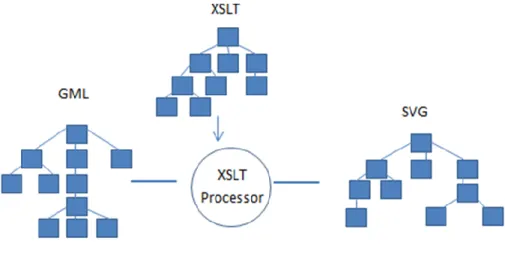
Figure 3.2.1 Role of XML Schema in Systems
In Figure 3.2.1, above, it can be seen that XML (Extensible Markup Language) schema and GML (Geography Markup Language) technologies together have a logic that allows the transformation to SVG document (Scalable Vector Graphics). There are XML schemas within GML, “feature.xsd” which is served by Open GIS Consortium, “geometry.xsd” and “xlink.xsd” which is served by W3C consortium. This creates "application Schema" when schemas come together. The XSLT file is created according to the application Schema. Within a schema document, it is made namespace and schema definitions in the root index like at the below.
<xs:schema targetNamespace="http://ogr.maptools.org/"
xmlns:ogr="http://ogr.maptools.org/"
xmlns:xs=http://www.w3.org/2001/XMLSchema
xmlns:gml="http://www.opengis.net/gml" elementFormDefault="qualified" version="1.0">
<xs:import namespace=http://www.opengis.net/gml
schemaLocation="http://schemas.opengis.net/gml/2.1.2/feature.xsd"/>
As we see above, each root element and other elements are created with taking xsd prefix. After that, it is made schema definition which belongs to the reference XML documents. Below, more sample code can be seen:
18
<xs:element name="Turkey" type="ogr:Turkey_Type" substitutionGroup="gml:_Feature"/>
<xs:complexType name="Turkey_Type"> <xs:complexContent>
<xs:extension base="gml:AbstractFeatureType"> <xs:sequence>
<xs:element name="geometryProperty" type="gml:PolygonPropertyType" nillable="true" minOccurs="0" maxOccurs="1"/>
<xs:element name="IL_ADI" nillable="true" minOccurs="0" maxOccurs="1"> <xs:simpleType> <xs:restriction base="xs:string"> <xs:maxLength value="20"/> </xs:restriction> </xs:simpleType> </xs:element>
<xs:element name="PLAKA_NO" nillable="true" minOccurs="0" maxOccurs="1"> <xs:simpleType> <xs:restriction base="xs:string"> <xs:maxLength value="2"/> </xs:restriction> </xs:simpleType> </xs:element>
<xs:element name="NUFUS_1990" nillable="true" minOccurs="0" maxOccurs="1"> <xs:simpleType> <xs:restriction base="xs:integer"> <xs:totalDigits value="10"/> </xs:restriction> </xs:simpleType> </xs:element>
<xs:element name="NUFUS_1997" nillable="true" minOccurs="0" maxOccurs="1"> <xs:simpleType> <xs:restriction base="xs:integer"> <xs:totalDigits value="10"/> </xs:restriction> </xs:simpleType> </xs:element>
<xs:element name="DEGISIM" nillable="true" minOccurs="0" maxOccurs="1"> <xs:simpleType>
<xs:restriction base="xs:decimal"> </xs:restriction>
</xs:simpleType> </xs:element>
<xs:element name="ORT_GELIR_1980" nillable="true" minOccurs="0" maxOccurs="1"> <xs:simpleType>
<xs:restriction base="xs:decimal"> </xs:restriction>
</xs:simpleType> </xs:element>
<xs:element name="Yuzolcumu" nillable="true" minOccurs="0" maxOccurs="1"> <xs:simpleType>
19 <xs:restriction base="xs:decimal"> <xs:totalDigits value="6"/> <xs:fractionDigits value="3"/> </xs:restriction> </xs:simpleType> </xs:element> </xs:sequence> </xs:extension> </xs:complexContent></xs:complexType>
20 4 Geography Markup Language (GML)
Geography Markup Language (GML) is based on Extensible Markup Language (XML) and is published from Open Geospatial Consortium (OGC). GML markup language is developed for definition, storing, transporting of spatial/geographical information. In addition, it is developed for interoperability problems among systems. GML is also considered as transporting of data. GML is a standard which is derived from XML. In addition, it is a data format. Geographical information is stroed in GML format and is translated to wanted format when it is necessary with using web technologies. GML which provides exchange of data between the various platforms has been prepared according to the rules. (OGC Standards, 2014)
In the first years of GML, it was modeled by RDF (Resource Description Framework) modelling technique. RDF is a technology that defines the source of the World Wide Web (WWW). After that, OGC defines XML schemas inside the GML documents. So, it enables easy communication with a variety of geographic databases. (JIANG Jun at all, 2008).
GML is instantiated for web technologies and web based services. GML is prepared according to “Geographical Information Systems Specifications”. GML makes spatial data exchange among various platforms. A GML document contains spatial and non-spatial information which is related with spatial information. A GML document is used for not only GIS systems but also geographical database as a data file. In the address of “http://www.opengis.org/technospecs.htm, it is explained that how translate GML files real world to two dimensional demonstration. (Komesli and Ünalır, 2004).
All the spatial details are obtained from consideration of the earth’s surface in abstract form. In positional detail, each of the details is defined as a set of names, types and value properties. An example can be seen below.
detayX : {isim, tip, değer}
Beside of name a type of a detail, also the number of properties that it can have are indicated with identification of the type. (Komesli and Ünalır, 2004). GML
21
digitizes the real world and then gets two dimensional models of the real world. So, GML creates a collection of the details. For example, it is defined “Name” property in the city detail. Besides basic properties like the “Name” property, there are also properties which give information related with geometry. For example, in the city detail, there are geometric properties such as “Polygon”.
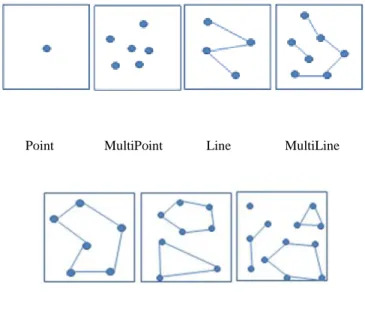
As a structure of GML, GML includes in itself both a geometry element and properties of geometry elements for coding spatial information in the spatial data file. GML has many objects within documents to identify geographical features. These objects are like this. “Coordinate Reference Systems”, “Geometry”, “Topology” ”Time”, “Units of Measure”, “Generalized Values”. In addition, there are basic geographical objects for demonstration of real world as two-dimensional. These are “Point”, “Multipoint”, “Polygon”, ”Multipolygon”, ”LineerRing”, “MultiGeometry".
Point MultiPoint Line MultiLine
Polygon MultiPolygon MultiGeometry
Figure 4.1 Simple GML Geometry Elements
In addition to the elements of this geometry, there are a box elements which define identified geographical area’s boundaries and <coordinates>, <coord>, <pos> elements which define coordinates information related with geographical information. This diversity can change according to version of GML and geometry elements. It is
22
used as different varieties in different geometries. For example, <coord> … </coord> is a geometric detail which is used in Point object. Usage of these tags are like this.
<coord><X> </X><Y> </Y></coord>
If we give an example of <coordinates> tag, it can be given “Polygon” tag.
<gml:Polygon><gml:outerBoundaryIs><gml:LinearRing>
<gml:coordinates> Noktalar kümesi </gml:coordinates>
</gml: LinearRing>gml: outerBoundaryIs><gml: Polygon>
There are static properties in each GML document which contain geographical data. Besides this, GML data’s modelling logic and labelling structure according to users/developers coding technique changes. Every GML document starts with “XML standard Caption”. After that, the “CSS (Cascading Style Sheet)” and address are defined. In the root of GML documents, there are schema location definition and namespace definition. Below, there is a showcase of basic GML documents.
<?xml version="1.0" encoding="UTF-8"?> <?xml-stylesheettype="text/xsl" href="http://www.buketakilli.com/gml/landsacpe.xsl"?> <gml:FeatureCollection xmlns:gml="http://www.opengis.net/gml" xmlns:xlink="http://www.w3.org/1999/xlink" xmlns:xsi="http://www.w3.org/2001/XMLSchema-instance" xmlns:fme="http://www.buketakilli.com/gml" xsi:schemaLocation="http://www.buketakilli.com/gml/landsacpe.xsd"> ( Section 1 )
Below, there is a small GML (Geography Markup Language) example related with “boundedBy” property. In this example, the boundary value identification of geographical information which is located in GML document is defined. This definition mentioned above is made after all namespace, schema, and style definitions.
23
<gml:Box srsName=”GHTR:984”>
<gml:coordinates>170000, 436000, 439000</gml:coordinates> </gml:Box>
</gml:boundedBy> (Section 2)
After this definition, it is followed with properties hierarchy which is defined by “GIS Specification Rules”.
<gml:featureMember>
<ogr:Turkey fid="Turkey.1">
<ogr:geometryProperty> <gml:Polygon> … </gml:Polygon> </ogr:geometryProperty> </ogr:Turkey fid="Turkey.1"> <ogr:Turkey fid="Turkey.2"> . . . . . .
</ogr:Turkey fid="Turkey.2"> … </gml:featureMember>
(Section 3)
GML contains geographical information inside. Because of that geometry elements are defined according to geographical properties of markup language. Some of these properties are named as Basic Properties of OGC (Open Geospatial Consortium). As we mentioned, these properties are Point, LineString, LinearRing, Polygon, MultiPoint, MultiLineString, MultiPolygon, MultiGeometry and Box. If we want to group, there are three groups. These groups are “Point”, “Line” and “Polygon”. There are some special definition rules for defining GML data. One of these rules is that it is taken a “gml” prefix which is identified an element belonging to the GML data during defining the geometry elements. This prefix comes from xmlns:gml=http://www.opengis.net/gml namespace. It is used every time “gml” prefix structure for this namespace. After GML namespace is included in a document, all geometries which is prepared from OpenGIS can be used within a GML document. For example a Point is defined with gml prefix like athe one below.
24 <gml:Point> <gml:coord> <gml:X>5.0</gml:X> <gml:Y>20.0</gml:Y> </gml:coord> </gml:Point>
Another GML definition property is that it mustn’t be taken as part of a Feature Collections element within the Feature the collections element which is defined in GML document. gml: featureMember element in GML document represents a feature which is inside a Feature Collection. GML files are always written with UTF8 encoding. The geometries are shown in the following table. In the table, each of the geometries which correspond for SVG technology in the future is included.
GML SVG
<Point> It can be represented by a rectangle, a
circle or a icon.<svg:point>, <svg:rect>
<LineString> <svg:polyline>
<LinearRing> <svg:polygon>
<Polygon> <svg:polygon>
<Box> <svg:rect>
<MultiPoint> It can be represented by a rectangle, a circle or a icon.<svg:point>, <svg:rect> <MultiLineString> It is defined inside <g> element as a
group of <svg:polyline> element.
<MultiPolygon> It is defined inside <g> element as a group of <svg:polygon> element.
Table 4. 1. SVG Correspondences of GML Geomety Elemenets
It is defined nodes which are defined between GML geometry element as “Property”. There are also elements which act as geometry elements. These elements are named as “Convince”. There are a lot of elements which is “Convince”. These are “BoundedBy”, “CenterOf & “Position”, “EdgeOf”, “CenterLineOf” and “extendOf”.
25
The following example is based on some simple geometry definitions according to version and geometry.
Point Example Polygon Example
Validation is provided by inclusion of “GML schema Documents” which provide the current document to be valid documents to GML documents. Schema documents are external documents for encoding with GML. These documents are “GML Detail Schema” (feature. xsd) and “GML Geometry Schema ” (geometry. xsd). With these schema documents, it is not necessary geometry for encoding geographical information. For example, a GML instance and GML schema definitions that belong to the GML instance can be given as follows.
<gml:featureMember> <ogr:Turkey> <ogr:IL_ADI>ADANA</ogr:IL_ADI> <ogr:PLAKA_NO>01</ogr:PLAKA_NO> <ogr:NUFUS_1990>1549233</ogr:NUFUS_1990> <ogr:NUFUS_1997>1682483</ogr:NUFUS_1997> <ogr:DEGISIM>11.6055524796825</ogr:DEGISIM> <ogr:ORT_GELIR_1980>497904000</ogr:ORT_GELIR_1980> <ogr:Yuzolcumu>14.256</ogr:Yuzolcumu> </ogr:Turkey> </gml:featureMember> (GML document)
<element name="Turkey " type="ex: TurkeyType" /> <complexType name=" TurkeyType">
<sequence> <gml:Point> <gml:pos>0 100</gml:pos> </gml:Point> <gml:Point> <gml:coordinates> 0,100 </gml:coordinates> </gml:Point> <gml:Polygon> <gml:exterior> <gml:LinearRing> <gml:coordinates>……</gml:coordinates> </gml:LinearRing> </gml:exterior> </gml:Polygon>
26
<element name= IL_ADI " type="string"/> <element name="PLAKA_NO " type="integer"/> <element name="NUFUS_1990" type=" integer " /> <element name= NUFUS_1997" type=" integer” /> <element name=" DEGISIM" type="integer"/>
<element name=" ORT_GELIR_1980" type="integer"/> <element name=" Yuzolcumu " type="integer"/>
</sequence>
</complexType>
(XML Schema)
<element name="Turkey " type="ex: TurkeyType" substitutionGroup="gml:_Feature"/>
<complexType name=" TurkeyType"> <complexContent>
<extension base="gml:AbstractFeatureType"> <sequence>
<element name= IL_ADI " type="string"/> <element name="PLAKA_NO " type="integer"/> <element name="NUFUS_1990" type=" integer " /> <element name= NUFUS_1997" type=" integer” /> <element name=" DEGISIM" type="integer"/>
<element name=" ORT_GELIR_1980" type="integer"/> <element name=" Yuzolcumu " type="integer"/>
</sequence> </extension> </complexContent>
</complexType> (GML Schema)
An important benefit of GML is that it retrieves the best resolution image related to the geographic area. At the same time these maps which are translated to presentation format can be saved in the user’s computer. Another benefit of GML is based on web technology. As a result, it can be visualized with web browsers on the user’s computer without additional software necessity. In addition, it is different from raster maps. As a result, Content of Maps which are obtained from a GML document
27
are seen by opening the documents and reading them online. It is possible for GML documents to have different interpretation of GML documents according to different XSLT stylesheet files. It is known that XSLT stylesheet file translates GML documents to presentation language.
Update and insert operations can be done in an easy way on the geography Markup Language file which can be constructed with just a notepad application. Another property is that GML files can hold isolated both geographical–spatial information and non-spatial information related with spatial information in the same file. When visualized this information can be linked to related locations with the URL. And then it can be displayed with all information when clicking in the geographical information on the user’s computer. In addition, it is possible to filter operations in the geographical information. This operation is done by the querying of non-spatial information. Users have the opportunity to select themes for filtering results. These features are just as related to and worked on the GML file; it is not possible for other image formats. On the SVG documents which are obtained from GML documents, it is possible to work with JavaScript scripting language for adding animation to documents. Detail and objects which show the changes in time may be shown easily with animated graphics. (Komesli and Ünalır, 2004).
GML is a spatial data format. In GML documents, geographical information is coded and it is published by the OGC consortium which is a non-profit organization. It is a general format to translate data to each other. At the same time, GML is worked on new generation PDA and mobile phones which are xml based devices. The obtained benefit of using GML technology is that it is suitable for all mentioned usage as a unique format. (Komesli and Ünalır, 2004).
There are many properties in GML geographical markup language. It must be defined that all these properties in the schema document for getting a valid GML document. There is no special style information in a GML document. For this reason, if it is required to visualize GML documents on the web browser, it is necessary to translate the document to a presentation document which is suitable for display by a technology. This technology is XSLT technology which works on a web platform.
28 4.1 GML Schemas
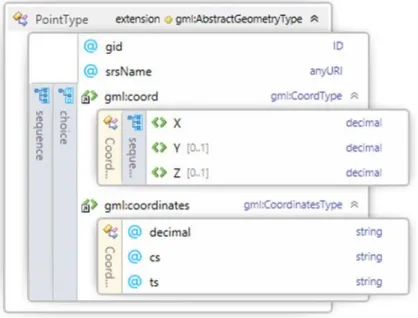
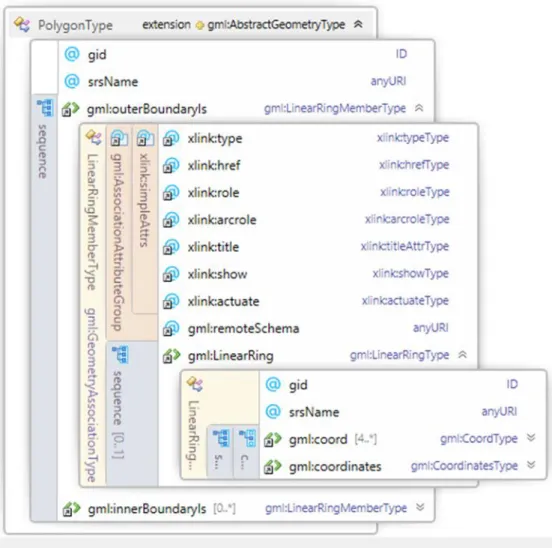
It is possible to construct XPath usage which is used on the XSLT with help of schemas which change with GML version. For example, in GML Schema 2.1.2, two geometry elements “Point” and “Polygon” are as below. By looking at the these schema diagrams, detailed information which is related with GML geometry can be understood.
Figure 4.1.1 Geometry Elements of Point
In this way, as shown below, it is possible to handle all geometry in GML versions with writing various condition expressions for gml: Point elements in XSLT.
<xsl:if test="contains(./gml:coord/gml:X, '.')"> . . . </xsl:if> <xsl:if test="contains(./gml:pos,' ')"> . . . </xsl:if>
<xsl:if test="contains(./gml:coordinates,' ')"> . . . </xsl:if> <xsl:if test="contains(./gml:coordinates,',')"> . . . </xsl:if>
In the same way, looking at the structure of the gml: Polygon It is possible to write the XSLT code associated with it.
29 <xsl:if
test="contains(//gml:Polygon/gml:outerBoundaryIs/gml:LinearRing/gml:coordinates,' ')"> . . . </xsl:if>
<xsl:if test="contains(//gml:Polygon/gml:exterior//gml:pos,',')"> . . . </xsl:if>
Figure 4.1.2 Geometry Elements of Polygon
<xsl:if test="contains(//gml:Polygon/gml:interior//gml:pos,',')"> . . . </xsl:if>
<xsl:if test="contains(//gml:Polygon/gml:exterior//gml:coordinates,' ')"> . . . </xsl:if> <xsl:if test="contains(//gml:Polygon/gml:interior//gml:coordinates,' ')"> . . . </xsl:if>